








A $9.99 renewal rarely feels dangerous. Ten unnoticed renewals can quietly distort an entire monthly budget. Learning how to manage subscriptions and recurring charges helps me expose that hidden spending before another billing cycle begins.
I never start by canceling everything. Instead, I list each service, calculate its annual cost, and compare the price with actual usage. This protects valuable subscriptions while exposing those surviving only because cancellation feels inconvenient.
Why Recurring Charges Become Hard to Control
Subscriptions rarely appear in one convenient place. They may be charged through credit cards, checking accounts, app stores, PayPal, family accounts, or company websites.
Annual memberships create another challenge. A payment can disappear for 11 months and return when the budget is already tight. Promotional offers may also renew at a higher standard rate.
The Federal Trade Commission describes free-trial conversions and automatic renewals as negative-option programs. Under these arrangements, a customer’s failure to cancel may result in continued billing. The FTC recommends reviewing renewal terms, cancellation instructions, and expected prices before signing up.
My basic rule is that every recurring payment needs four details:
- Its purpose
- Its billing source
- Its next renewal date
- Its total annual cost
A missing detail makes the charge harder to control.
Step 1: Build a Complete Subscription Inventory
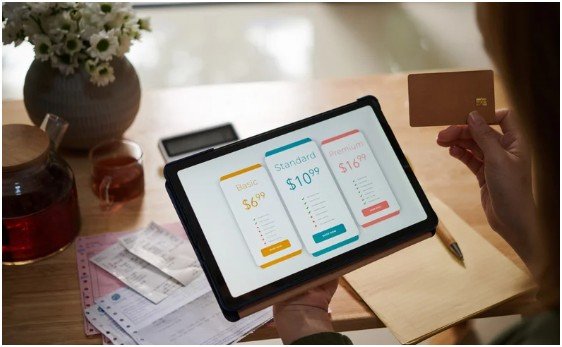
The first practical step in how to manage subscriptions and recurring charges is locating every active payment.
I review at least three months of bank and credit card statements. I extend the search to 12 months when annual software, insurance add-ons, warehouse memberships, or professional services may be involved.
Review Financial Statements
I scan statements for repeated amounts, unfamiliar merchants, and charges appearing on similar dates each month.
The merchant name may differ from the service name. Therefore, I search unfamiliar billing descriptions before assuming a charge is fraudulent.
My subscription tracker contains six columns:
- Service name
- Amount
- Billing frequency
- Payment account
- Renewal date
- Cancellation method
A spreadsheet works well, but a notes app or subscription tracker can also do the job. The best system is the one I will actually review.
Check App Stores, Emails, and Payment Accounts
Bank statements do not reveal every useful detail. I also inspect Apple subscriptions, Google Play subscriptions, PayPal automatic payments, and purchase-related email accounts.
I search my inbox for terms such as “subscription,” “membership,” “free trial,” “renewal,” “receipt,” and “automatic payment.”
Google warns that uninstalling an Android app does not automatically cancel its subscription. Users must manage the payment through the Google Play subscription controls.
I then combine renewal dates with my broader system for organizing monthly bills and due dates. This creates one calendar for subscriptions, utilities, insurance, credit payments, and other obligations.
Step 2: Calculate the Real Annual Cost
Monthly pricing makes recurring expenses appear smaller than they are. I convert every charge into an annual figure before deciding whether it deserves space in my budget.
The calculation is simple:
Monthly charge × 12 = annual cost
For annual subscriptions, I divide the total by 12 to find the monthly equivalent.
Suppose I pay:
- $18 monthly for streaming
- $120 yearly for a fitness app
- $3 monthly for cloud storage
The monthly equivalent is $31, while the annual cost is $372. That total provides more useful context than three seemingly harmless payments.
Use a Cost-Per-Use Score
My original method adds a cost-per-use calculation:
Monthly subscription cost ÷ monthly uses = cost per use
A $24 service used twice costs $12 per use. A $15 service used 20 times costs just $0.75 per use.
Price alone does not determine value. Usage does.
I place every service into one of four categories:
Keep: Frequently used and worth its annual cost.
Fix: Useful, but the current plan costs too much.
Cancel: Rarely used, duplicated, or no longer relevant.
Watch: Valuable, but approaching renewal or a possible price increase.
This scoring system turns how to manage subscriptions and recurring charges into a value-based decision instead of a cancellation spree.
Step 3: Centralize Payments and Renewal Alerts
Scattered payments create scattered attention. Where practical, I route optional subscriptions through one dedicated payment method.
Essential bills can remain separate. That prevents an unexpected entertainment renewal from competing with rent, utilities, or insurance.
Choose One Payment Method
Using one card for optional subscriptions creates one statement to review each month. It also makes new charges easier to identify.
However, changing or replacing a card is not the same as canceling a subscription. I always end the service through the merchant or billing platform and retain confirmation.
Create a Renewal Calendar
I set two types of reminders:
- Seven days before monthly renewals
- Thirty days before annual renewals
Each reminder includes the price, billing account, and cancellation location. I also add one question: “Would I purchase this service again today?”
That question removes the influence of habit.
For free trials, the FTC recommends recording the cancellation deadline and monitoring account statements for unexpected charges.
I also enable real-time transaction alerts through my bank or card provider. A renewal notification creates an immediate opportunity to review the service.
Step 4: Cancel, Pause, or Downgrade Services

Understanding how to manage subscriptions and recurring charges means choosing the most useful action. Cancellation is only one option.
A service may offer:
- A temporary pause
- A cheaper plan
- A family membership
- A limited plan
- A negotiated renewal rate
I compare these options before ending something I still use.
Cancel Through the Correct Platform
I first identify who processes the payment. A service purchased through Apple or Google may need to be canceled through that platform rather than the provider’s website.
Apple allows customers to manage eligible subscriptions purchased through Apple or the App Store from their account settings. Google Play also provides controls for canceling, pausing, or changing supported subscriptions.
After canceling, I save the confirmation email or screenshot. I record the final access date and inspect the next statement.
Cancellation does not automatically guarantee a refund. These are separate requests.
Stop Unwanted Bank Debits
When a company continues withdrawing money from a bank account, canceling the subscription may not be enough.
The Consumer Financial Protection Bureau advises consumers to revoke payment authorization with the company. Consumers can also contact their bank or credit union about stopping future automatic payments.
Federal Regulation E allows a consumer to stop a preauthorized electronic fund transfer by notifying the financial institution at least three business days before the scheduled transfer. Bank procedures and possible fees may vary.
I keep copies of cancellation requests, emails, chat transcripts, and payment records. This evidence can support a dispute if billing continues.
Step 5: Complete a 30-Day Subscription Reset
Once a year, I apply a 30-day reset to questionable subscriptions.
I pause or cancel nonessential services that I am unsure about. I then record which services I genuinely miss during the next month.
The result is usually clear. A service I immediately need may justify its cost. A service I completely forget probably does not.
For subscriptions that cannot be paused, I label them “renew only with proof of use.” Before renewal, I check login activity, completed workouts, deliveries, downloads, or other measurable use.
Intentions do not count as usage.
Finally, I complete a ten-minute review each month. I compare my tracker with recent statements, update prices, record new trials, and remove canceled accounts. That simple routine is the foundation of how to manage subscriptions and recurring charges effectively.
Frequently Asked Questions
1. How can I find all recurring charges on my accounts?
Review three to 12 months of statements, app-store subscriptions, PayPal payments, email receipts, family accounts, and free-trial confirmations.
2. What is the best way to track subscription renewal dates?
Use a calendar or tracker with reminders seven days before monthly charges and 30 days before annual renewals.
3. Can my bank block a recurring subscription charge?
Yes, but revoke authorization with the merchant first and then follow your bank’s written stop-payment or dispute procedure.
4. How often should I review subscriptions and recurring payments?
Review them monthly and before every annual renewal, free-trial deadline, price increase, or payment-card change.
Stop Letting Silent Charges Boss You Around
I treat every recurring payment as a new purchase rather than a permanent fixture. That mindset makes how to manage subscriptions and recurring charges far easier.
Start by reviewing one credit card or bank statement today. Annualize every repeated charge and cancel one service you would not willingly purchase again.
Your budget does not need a dramatic financial detox. It simply needs fewer silent renewals making decisions without you.